How to Create a Payment ID on Payluk
Creating a Payment ID on Payluk is the first step to conducting secure escrow transactions as a seller. This comprehensive guide will walk you through the entire process, from accessing the feature to sharing your payment link with buyers.
Whether you're selling products, offering services, or facilitating any transaction that requires payment security, Payluk's escrow system protects both you and your buyer throughout the entire process.
What is a Payment ID?
A Payment ID is a unique identifier that links to your escrow transaction. When you create a Payment ID, you're essentially setting up a secure payment request that holds funds in escrow until both parties fulfill their obligations.
Key Benefits:
- 🔒 Funds are held securely until delivery is confirmed
- ✅ Automated dispute resolution system
- 💰 Flexible fee payment options
- 📱 Easy sharing across multiple platforms
- ⏱️ Customizable delivery timelines
Step 1: Access the Create Payment ID Feature
After completing the onboarding process, you'll land on the Payluk home screen. Here's where your journey begins:
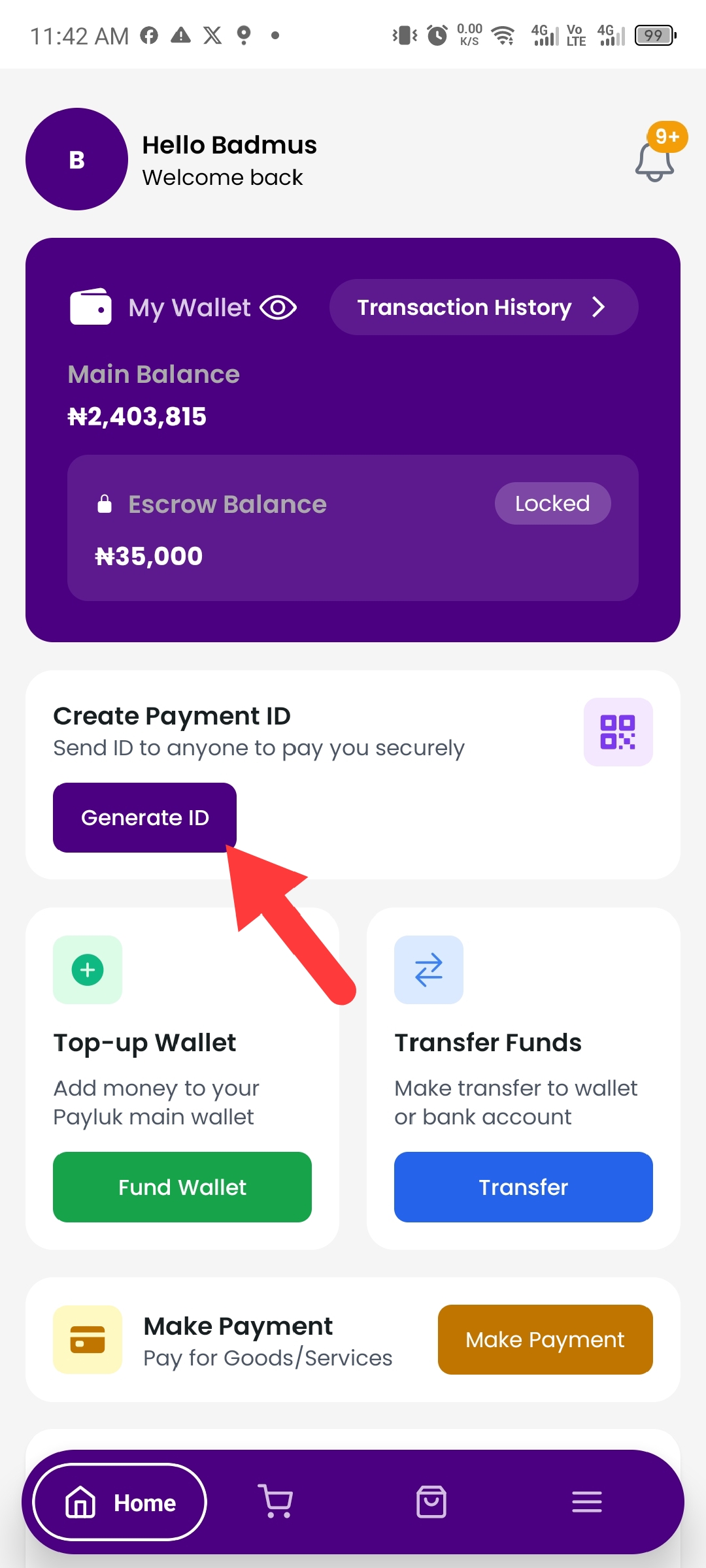
How to Navigate:
- Open the Payluk app on your mobile device
- Look for the prominent "Create Payment ID" button on your home screen
- Tap the button to begin the payment creation process
The Create Payment ID button is strategically placed for easy access, ensuring you can quickly initiate transactions whenever needed.
Step 2: Fill in Transaction Details
Once you tap "Create Payment ID," you'll be directed to a form where you need to provide essential transaction information. This step ensures both parties have clear expectations.
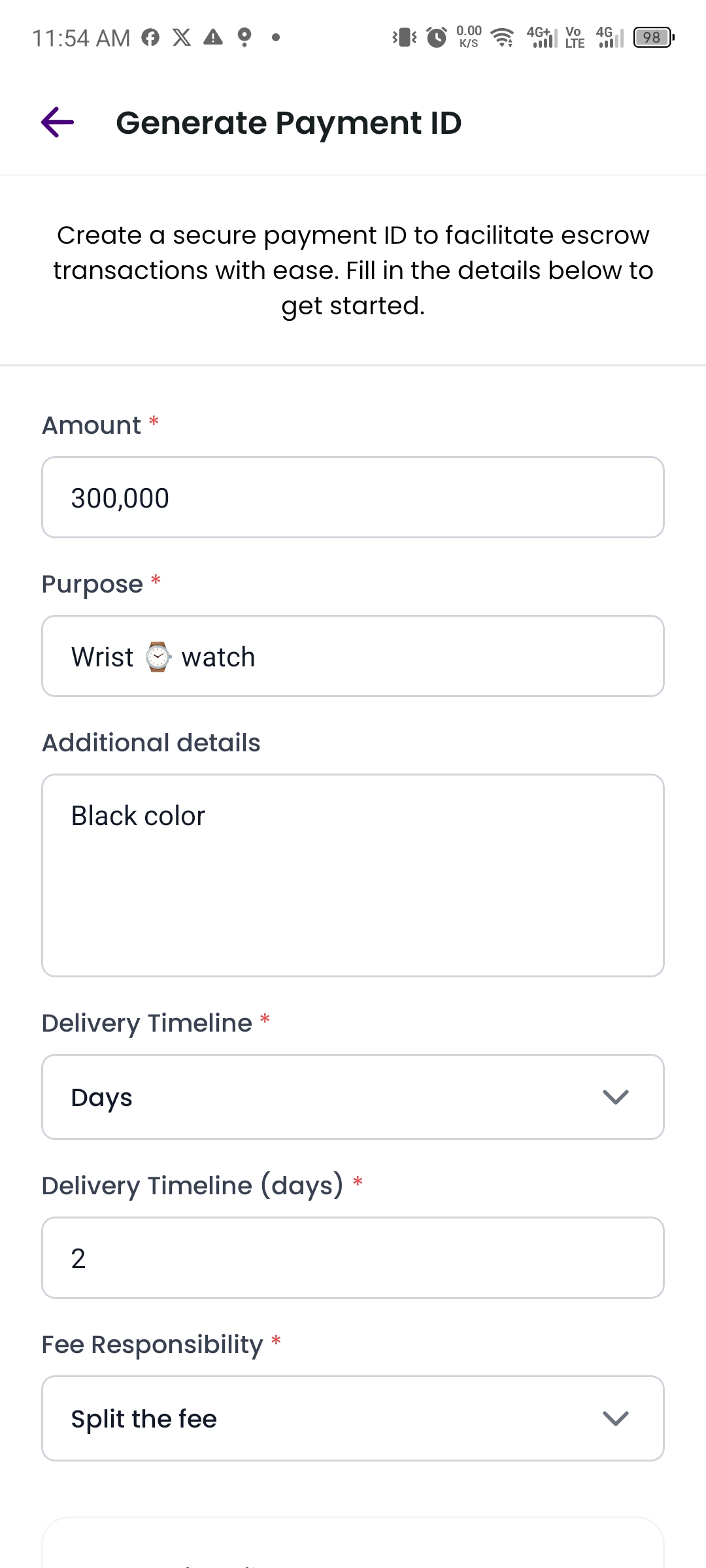
Required Fields:
1. Amount (NGN)
- Enter the transaction amount in Nigerian Naira
- Minimum amount: ₦1,000
- Must be a positive whole number
- Example: ₦50,000
2. Purpose
- Briefly describe what the payment is for
- Be specific to avoid confusion
- Examples: "Website Development," "Product Purchase," "Graphic Design Services"
- This field is required
3. Delivery Timeline
Choose how you want to measure the delivery period:
- Minutes - For instant or very quick services
- Hours - For same-day deliveries
- Days - For standard deliveries (most common)
4. Max Delivery Time
- Specify the maximum time for delivery completion
- Range: 1 to 365 units (based on your selected timeline)
- Example: If you select "Days" and enter "7," the buyer has 7 days to confirm delivery
- This starts counting from when the buyer makes the payment
5. Who Pays the Transaction Fee?
Choose who covers the Payluk escrow service fee:
- Buyer - Buyer pays the entire fee
- Seller - You (the seller) pay the entire fee
- Both - Fee is split equally between both parties
Optional Fields:
6. Description (Optional)
- Add detailed information about the product or service
- Include specifications, terms, or special conditions
- This helps set clear expectations with your buyer
7. Total Quantity (Optional)
- Specify the number of items or units
- Useful for product sales
- Minimum: 1 unit
8. Category (Optional)
- Select the category that best fits your transaction
- Helps with organization and reporting
- Categories may include: Electronics, Services, Real Estate, etc.
Step 3: Review and Create
Before creating your Payment ID, take a moment to review all the information:
✅ Double-check the amount - Ensure it's correct
✅ Verify delivery timeline - Make sure it's realistic
✅ Review fee arrangement - Confirm who's paying
✅ Check all details - Accuracy prevents disputes
Once you're satisfied, tap the "Create Payment ID" button at the bottom of the screen.
Step 4: Share Your Payment ID
After successfully creating your Payment ID, you'll be presented with a confirmation screen containing your unique payment link and sharing options.
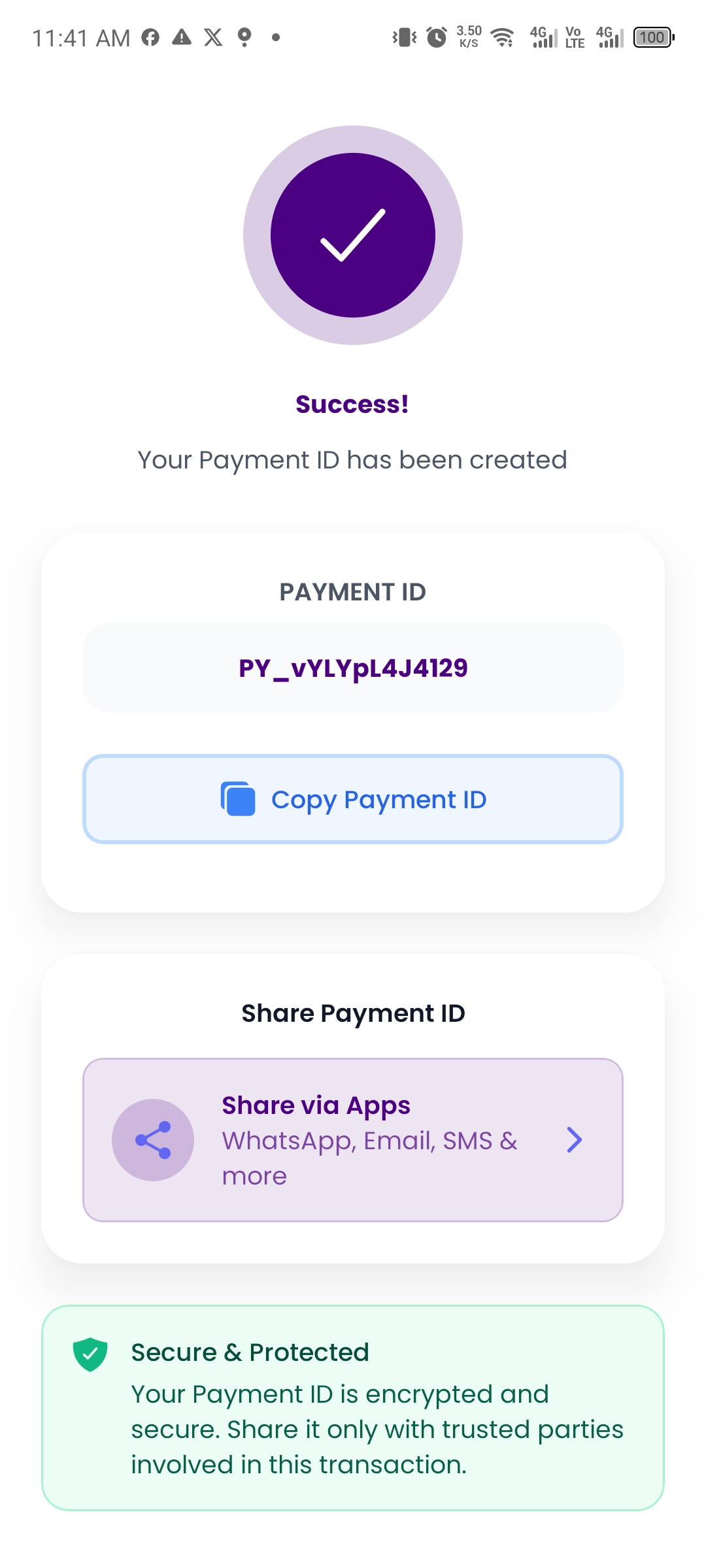
Sharing Options:
Option 1: Copy Payment ID
- Tap the "Copy Payment ID" button
- The unique ID is copied to your clipboard
- Manually paste and send it to your buyer via any platform
Option 2: Direct Share
Instantly share your payment link through:
- WhatsApp 📱 - Send directly to a WhatsApp contact
- Email 📧 - Share via email with transaction details
- SMS 💬 - Send as a text message
- Twitter/X 🐦 - Share on social media
- Facebook 👥 - Post or message on Facebook
- More Options ⋯ - Access additional sharing platforms
Payment Link Format:
https://app.payluk.ng/escrow/details/PY_XXXXXXXXYour buyer will receive a secure link that directs them to the payment page where they can:
- View complete transaction details
- Make payment securely
- Track delivery status
- Confirm receipt of goods/services
What Happens After Sharing?
Once you share the Payment ID with your buyer, here's the automatic workflow:
1. Buyer Makes Payment
- Buyer clicks the payment link
- Reviews transaction details
- Makes payment using their preferred method
- Funds are immediately held in escrow
2. You Get Notified
- Receive email notification about payment
- Get push notification on your mobile device
- Payment status changes to "Paid" in your app
3. Deliver Goods/Services
- Navigate to the transaction in your app
- View the countdown timer for delivery
- Complete your part of the transaction
- Provide delivery confirmation if required
4. Buyer Confirms Receipt
- Buyer reviews and confirms they received the goods/services
- Funds are released from escrow to your main wallet
- Transaction is marked as complete
5. Automatic Protection (If Buyer Doesn't Respond)
- If delivery countdown expires without buyer confirmation
- A "Claim Funds" button appears in your transaction details
- Click to request payment release
- If buyer doesn't dispute, funds automatically transfer to you
- System closes the transaction
Pro Tips for Success
✨ Set Realistic Delivery Times
Don't promise what you can't deliver. Add buffer time for unexpected delays.
✨ Be Detailed in Descriptions
Clear descriptions prevent misunderstandings and disputes.
✨ Communicate Clearly
Keep your buyer informed throughout the delivery process.
✨ Screenshot Transaction Details
Keep records of all important transaction information.
✨ Negotiate Fee Payment Upfront
Discuss who pays fees before creating the Payment ID to avoid confusion.
Common Questions
Q: Can I edit a Payment ID after creation?
A: Yes, if payment has not been made, Payment IDs cannot be edited if buyer has paid to seller escrow.
Q: What's the minimum transaction amount?
A: The minimum transaction amount is ₦1,000.
Q: How long can a delivery timeline be?
A: You can set delivery timelines from 1 minute up to 365 days.
Q: What if the buyer doesn't pay?
A: The Payment ID remains active, but no escrow is created until payment is made. You can share the same Payment ID multiple times.
Q: Can I have multiple Payment IDs active?
A: Yes! You can create as many Payment IDs as needed for different transactions.
Q: What happens if there's a dispute?
A: Payluk's support team mediates disputes. Evidence from both parties is reviewed before resolution.
Security Features
Payluk prioritizes your transaction security:
🔐 End-to-End Encryption - All transaction data is encrypted
🛡️ Escrow Protection - Funds held securely until delivery confirmed
✅ Verified Transactions - All payments are verified and tracked
🔍 Transparent Process - Both parties can track transaction status
⚖️ Fair Dispute Resolution - Neutral mediation when needed
📧 Email & Push Notifications - Stay informed at every step
Need Help?
If you encounter any issues while creating a Payment ID or have questions about the process:
📧 Email: [email protected]
🕐 Support Hours: Monday - Friday, 9AM - 6PM GMT+1
Conclusion
Creating a Payment ID on Payluk is straightforward and takes less than 2 minutes. The escrow system protects both you and your buyer, ensuring smooth, secure transactions every time.
Remember: The key to successful transactions is clear communication, accurate information, and realistic delivery timelines.
Ready to get started? Open your Payluk app and create your first Payment ID today!